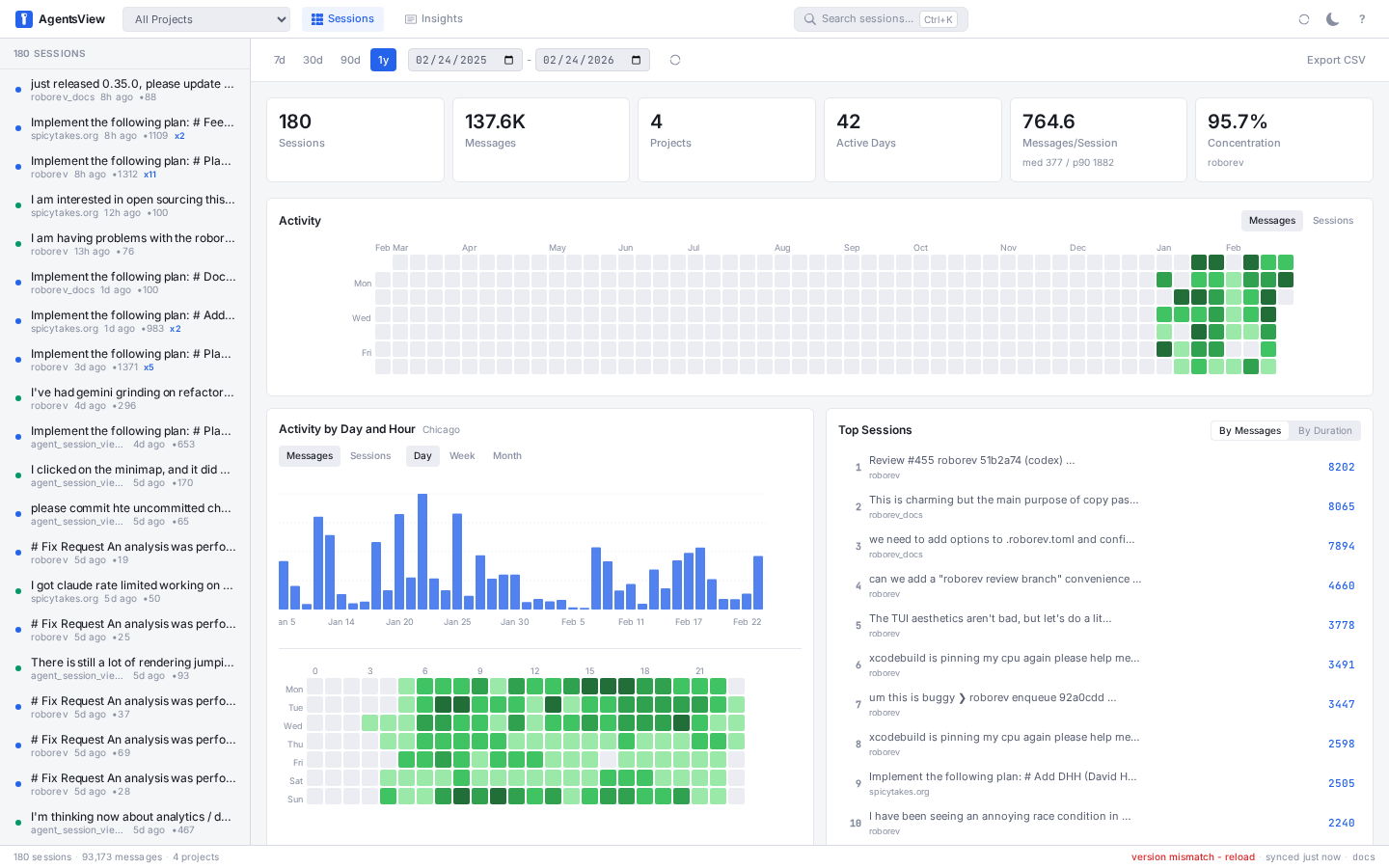
Browse, search, and track costs across all your AI coding agents. One binary, no accounts, everything local.
# macOS / Linux
curl -fsSL https://agentsview.io/install.sh | bash

# Windows
powershell -ExecutionPolicy ByPass -c "irm https://agentsview.io/install.ps1 | iex"
Or download the desktop app (macOS / Windows) from
GitHub Releases or via
homebrew: brew install --cask agentsview
Or run the published Docker image:
docker run --rm -p 127.0.0.1:8080:8080 \
  -v agentsview-data:/data \
  -v "$HOME/.claude/projects:/agents/claude:ro" \
  -v "$HOME/.forge:/agents/forge:ro" \
  -e CLAUDE_PROJECTS_DIR=/agents/claude \
  -e FORGE_DIR=/agents/forge \
ghcr.io/kenn-io/agentsview:latestagentsview serve # start server, open web UI
agentsview usage daily # print daily cost summaryOn first run, agentsview discovers sessions from every supported agent on your
machine, syncs them into a local SQLite database, and opens a web UI at
http://127.0.0.1:8080.
agentsview binds to loopback and validates the request Host header to guard
against DNS-rebinding attacks. When you reach it through SSH port-forwarding, a
reverse proxy, or a remote dev environment (exe.dev, Codespaces, Coder, WSL2),
the browser sends a Host that the server does not recognize, so API requests
such as /api/v1/settings are rejected with 403 Forbidden.
To fix this, restart the server with --public-url set to the exact origin you
open in the browser:
# Browser opens http://127.0.0.1:18080 via `ssh -L 18080:127.0.0.1:8080 host`
agentsview serve --public-url http://127.0.0.1:18080

# Browser opens a forwarded hostname
agentsview serve --public-url https://your-workspace.exe.dev
Use --public-origin (repeatable or comma-separated) to trust additional
browser origins. If you expose the UI beyond loopback, also enable
--require-auth.
The container image defaults to local agentsview serve. Set PG_SERVE=1 to
switch the startup command to agentsview pg serve instead.
docker-compose.prod.yaml is included as a production example:
docker compose -f docker-compose.prod.yaml up -dThe included compose file persists the agentsview data directory in a named
volume and mounts Claude, Codex, Forge, and OpenCode session roots read-only.
The container runs as root, so prefer a named volume for /data over a host
bind mount; if you do bind-mount, pre-create the directory with the desired
ownership to avoid root-owned files in your home directory.
The examples publish the UI on loopback only (127.0.0.1). If you need to
expose it beyond localhost, enable --require-auth and publish the port
intentionally.
Important: a containerized agentsview instance can only discover agent sessions from directories you explicitly mount into the container. If you do not mount an agent's session directory and point the matching env var at it, that agent will not appear in the UI.
Example PostgreSQL-backed startup:
docker run --rm -p 127.0.0.1:8080:8080 \
  -e PG_SERVE=1 \
  -e AGENTSVIEW_PG_URL='postgres://user:password@postgres.example.com:5432/agentsview?sslmode=require' \
ghcr.io/kenn-io/agentsview:latestagentsview usage is a fast, local replacement for ccusage and similar tools.
It tracks token consumption and compute costs across all your coding agents
-- not just Claude Code. Because session data is already indexed in SQLite,
queries are over 100x faster than tools that re-parse raw session files on every
run.
# Daily cost summary (default: last 30 days)
agentsview usage daily

# Per-model breakdown
agentsview usage daily --breakdown

# Filter by agent and date range
agentsview usage daily --agent claude --since 2026-04-01

# One-line summary for shell prompts / status bars
agentsview usage daily --all --json
agentsview usage statusline
Features:
- Automatic pricing via LiteLLM rates (with offline fallback)
- Prompt-caching-aware cost calculation (cache creation / read tokens)
- Per-model breakdown with
--breakdown - Date filtering (
--since,--until,--all), agent filtering (--agent) - JSON output (
--json) for scripting - Timezone-aware date bucketing (
--timezone) - Works standalone -- no server required, just run the command
agentsview session usage <id> prints per-session token statistics plus a cost
estimate for a single session. The output reports the session's total output
tokens and peak context tokens, plus a cost estimate in USD (cost_usd) when
pricing is available for the session's model(s) (has_cost). Cost is computed
from input/output and cache tokens internally, but only the output-token and
peak-context totals are reported alongside the cost.
# Print token usage and cost for a specific session
agentsview session usage <id>

# JSON output for scripting
agentsview session usage <id> --format json
The deprecated alias agentsview token-use <id> remains available for
compatibility and now also reports cost estimates.
agentsview stats emits window-scoped analytics over recorded sessions: totals,
archetypes (automation vs. quick/standard/deep/marathon), distributions for
session duration, user-message count, peak context, and tools-per-turn, plus
cache economics, tool/model/agent mix, and a temporal hourly breakdown. The
--format json output follows a versioned v1 schema (schema_version: 1)
suitable for downstream consumers.
By default, stats only reads the local SQLite archive. Git-derived outcome
metrics are opt-in because they can be slow or brittle on large/missing repos:
use --include-git-outcomes for commits/LOC/files changed, and
--include-github-outcomes for GitHub PR counts via gh (this also enables git
outcomes).
# Human-readable summary over the last 28 days
agentsview stats

# Machine-readable JSON over a fixed date range
agentsview stats --format json --since 2026-04-01 --until 2026-04-15

# Restrict to one agent and inspect the schema
agentsview stats --format json --agent claude | jq '.schema_version'

# Include expensive local git outcome metrics explicitly
agentsview stats --include-git-outcomes| Dashboard | Session viewer |
|---|---|
|
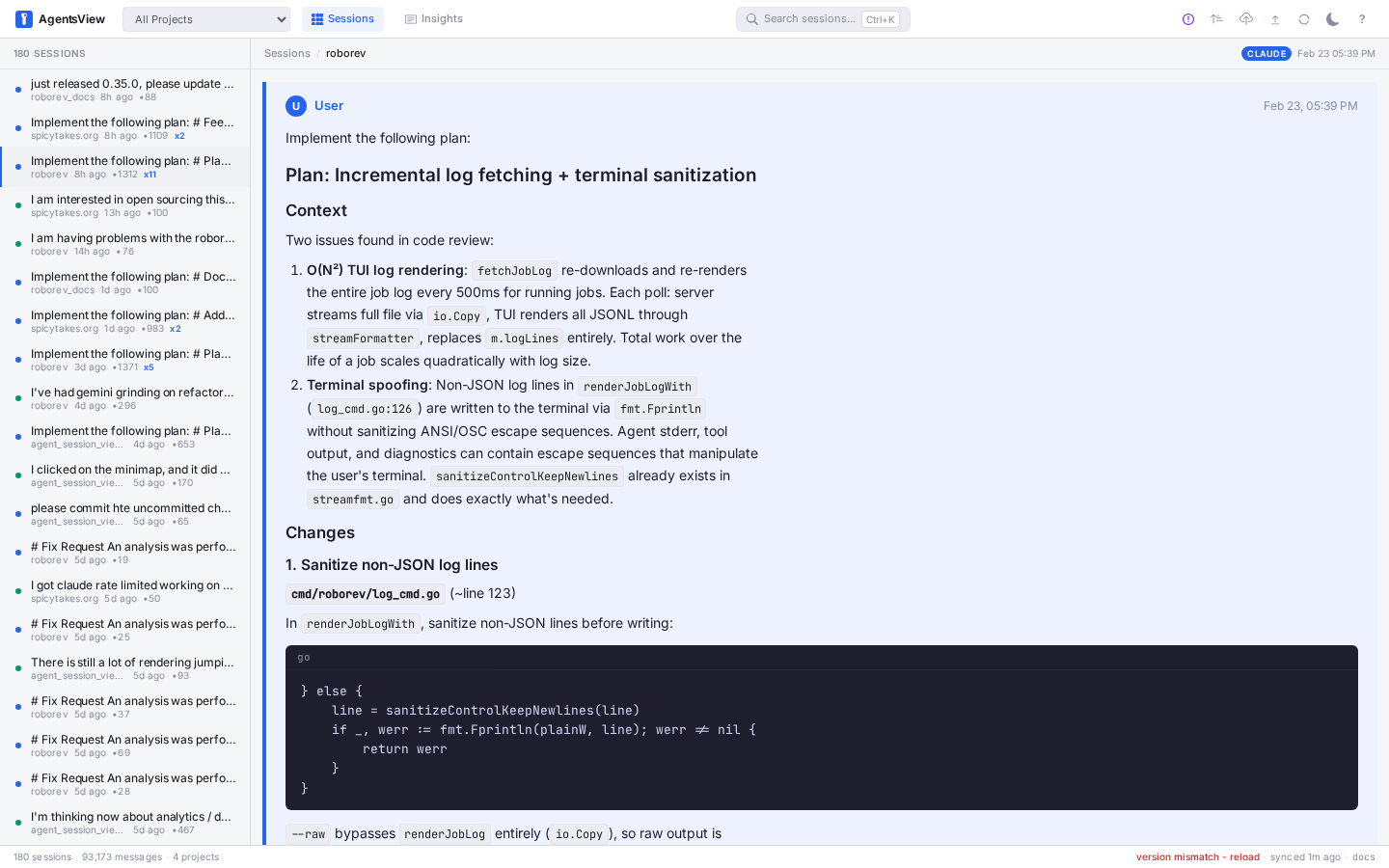 |
| Search | Activity heatmap |
|---|---|
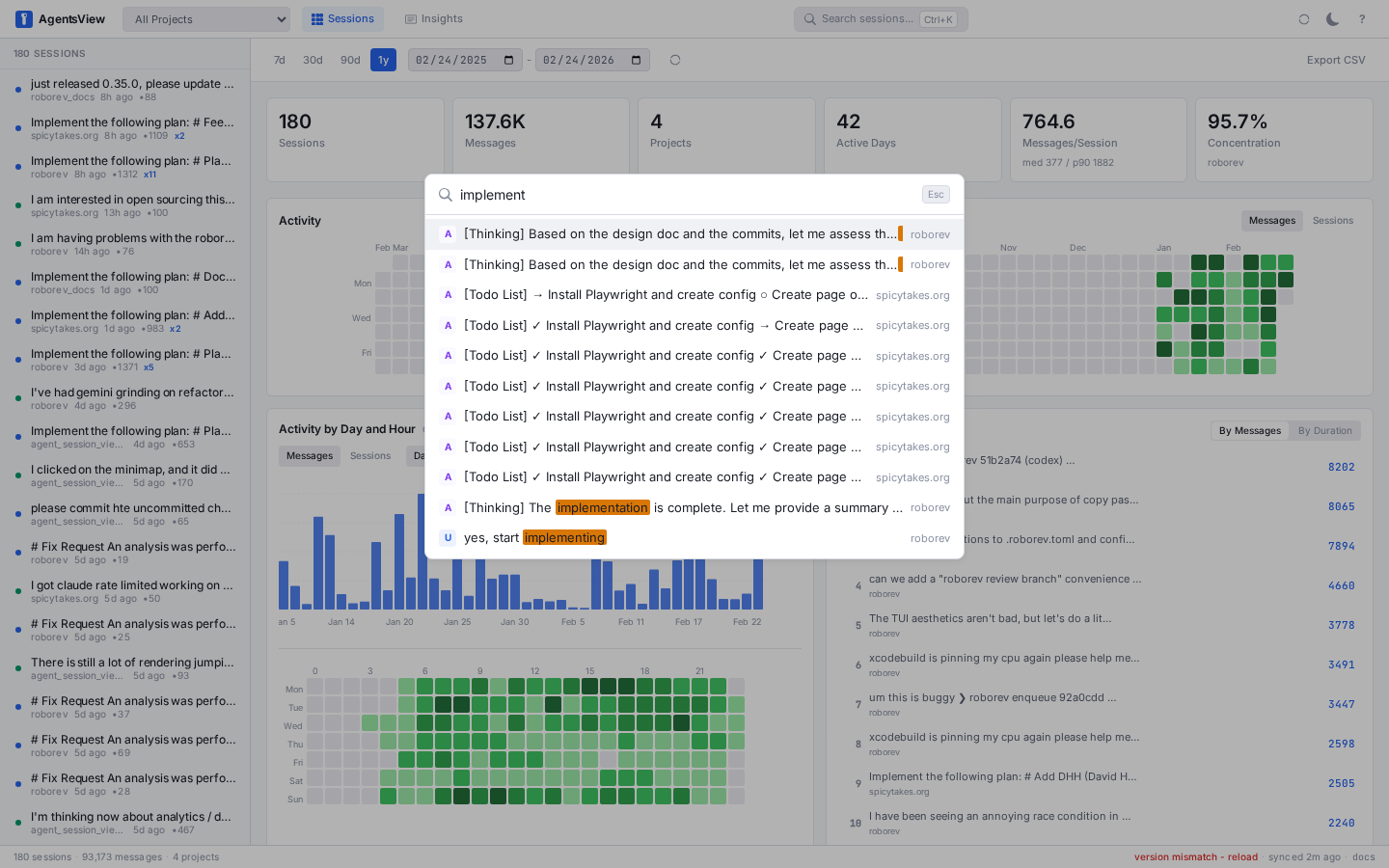 |
 |
- Full-text search across all message content (FTS5)
- Token usage and cost dashboard -- per-session and per-model cost breakdowns, daily spend charts, all in the web UI
- Analytics dashboard -- activity heatmaps, tool usage, velocity metrics, project breakdowns
- Live updates via SSE as active sessions receive new messages
- Keyboard-first navigation (
j/k/[/],Cmd+Ksearch,?for all shortcuts) - Export sessions as HTML or publish to GitHub Gist
agentsview auto-discovers sessions from all of these:
| Agent | Session Directory |
|---|---|
| Claude Code | ~/.claude/projects/ |
| Codex | ~/.codex/sessions/ |
| Copilot CLI | ~/.copilot/ |
| Gemini CLI | ~/.gemini/ |
| OpenCode | ~/.local/share/opencode/ |
| OpenHands CLI | ~/.openhands/conversations/ |
| Cursor | ~/.cursor/projects/ |
| Amp | ~/.local/share/amp/threads/ |
| iFlow | ~/.iflow/projects/ |
| Zencoder | ~/.zencoder/sessions/ |
| VSCode Copilot | ~/Library/Application Support/Code/User/ (macOS) |
| Pi | ~/.pi/agent/sessions/ |
| Qwen Code | ~/.qwen/projects/ |
| OpenClaw | ~/.openclaw/agents/ |
| QClaw | ~/.qclaw/agents/ |
| Kimi | ~/.kimi/sessions/ |
| Kiro CLI | ~/.kiro/sessions/cli/, ~/.local/share/kiro-cli/ |
| Kiro IDE | ~/Library/Application Support/Kiro/ (macOS) |
| Cortex Code | ~/.snowflake/cortex/conversations/ |
| Hermes Agent | ~/.hermes/sessions/ |
| WorkBuddy | ~/.workbuddy/projects/ |
| Forge | ~/.forge/ |
| Piebald | ~/.local/share/piebald/ |
| Warp | ~/.warp/ (platform-dependent) |
| Positron Assistant | ~/Library/Application Support/Positron/User/ (macOS) |
| Antigravity | ~/.gemini/antigravity/ |
| Antigravity CLI | ~/.gemini/antigravity-cli/ (see note below) |
Each directory can be overridden with an environment variable. See the configuration docs for details.
By default, agentsview indexes Antigravity CLI sessions in summary mode:
your prompts from history.jsonl plus any plain-text artifacts under brain/
(plans, walkthroughs, checkpoints). Assistant turns and tool calls live in
AES-GCM-encrypted .pb files and are not visible in this mode.
To unlock full transcripts, run
agy-reader alongside agentsview.
agy-reader talks to the local Antigravity daemon, decrypts each conversation,
and writes a <uuid>.trajectory.json sidecar next to the encrypted .pb file.
agentsview's file watcher detects the sidecar automatically and parses it in
place of summary mode -- no agentsview restart needed.
go install github.com/mjacobs/agy-reader@latest

# Generate sidecars for existing sessions...
agy-reader --sync

# ...or keep them fresh as you work.
agy-reader --watch
agy-reader auto-discovers the Antigravity daemon URL by parsing
~/.gemini/antigravity-cli/cli.log. If discovery fails (e.g. the log has
rotated), the command prints platform-specific instructions for locating the
port and exporting ANTIGRAVITY_DAEMON_URL manually.
Sidecars stay on your machine. agentsview makes no outbound request to produce or read them, and treats sidecars as untrusted structured input -- see SECURITY.md for the trust model.
Push session data to a shared PostgreSQL instance for team dashboards:
agentsview pg push       # push local data to PG
agentsview pg serve # serve web UI from PG (read-only)To keep a shared PostgreSQL database current without running pg push by
hand, run the auto-push daemon. It watches your session directories and
pushes shortly after new sessions are recorded, with a periodic floor as a
safety net:
agentsview pg push --watch                 # foreground, Ctrl-C to stop
agentsview pg push --watch --debounce 1m   # custom coalesce window
agentsview pg push --watch --interval 5m   # custom floor interval
The daemon reads the same [pg] config as pg push, so the PostgreSQL
DSN must be set in your config file (or an environment variable it
expands). Protect the config file, since it holds credentials:
chmod 600 ~/.agentsview/config.tomlTo run it unattended as an OS service (launchd on macOS,
systemd --user on Linux):
agentsview pg service install     # generate the unit, enable + start it
agentsview pg service status      # show manager status
agentsview pg service logs -f     # follow the service log
agentsview pg service uninstall   # stop and remove
Linux headless machines: systemd --user services stop at logout and
do not start at boot unless lingering is enabled for your user. install
detects this and prints the command; you can also run it yourself:
loginctl enable-linger "$USER"See PostgreSQL docs for setup and configuration.
No telemetry, no analytics, no accounts. All data stays on your machine. The
server binds to 127.0.0.1 by default. The only outbound request is an optional
update check on startup (disable with --no-update-check).
Full docs at agentsview.io: Quick Start -- Usage Guide -- CLI Reference -- Configuration -- Architecture
Requires Go 1.26+ (CGO), Node.js 22+.
make dev            # Go server (dev mode)
make frontend-dev   # Vite dev server (run alongside make dev)
make build          # build binary with embedded frontend
make install        # install to ~/.local/bin
make test # Go tests (CGO_ENABLED=1 -tags fts5)
make lint # golangci-lint + NilAway
make nilaway # NilAway through custom golangci-lint
make e2e # Playwright E2E testsPre-commit hooks via prek: run make lint-tools
and make install-hooks after cloning (requires prek and uv).
cmd/agentsview/     CLI entrypoint
internal/           Go packages (config, db, parser, server, sync, postgres)
frontend/           Svelte 5 SPA (Vite, TypeScript)
desktop/            Tauri desktop wrapper
Inspired by claude-history-tool by Andy Fischer and claude-code-transcripts by Simon Willison.
MIT